

Easily add an affiliate link disclosure every time you create your awesome blog posts. This step-by-step WordPress tutorial will teach you how to create a reusable block in Gutenberg in just minutes.
Why Does Your Post Needs an Affiliate Link Disclosure?
According to the Federal Trade Commission (FTC) endorsement guides, bloggers are required to disclose to their readers that they are receiving something in exchange for displaying an affiliate link on their website. In the case of affiliate links, they are receiving a commission if someone were to click the link and purchase the linked product. Not disclosing this information is considered a deception to the reader. For more information, check out The FTC’s Endorsement Guides: What People Are Asking.
Whether you’ve already started affiliate marketing, or you are just now considering it, you do need an affiliate link disclosure statement before you introduce any affiliate links in your blog posts or other pages.

How to Create A Reusable Block in Gutenberg for Your Affiliate Link Disclosure
Imagine typing your affiliate disclosure every time you wrote a blog post. No thanks! That’s why I created a reusable block, and simply insert it into any of my blog posts that have affiliate links.
This is what mine currently looks like:
This post may contain affiliate links. I may earn a small commission from purchases made through them, at no additional cost to you. Please see my Disclosure Policy for more details.
I place it right after the first paragraph of my blog post before any affiliate links are published.
Want to create your own affiliate disclosure reusable block? Let’s do it!
1. Add a new paragraph block in Gutenberg.

2. Type your disclosure in the paragraph block.

Not sure what to write? Here are some examples:
Disclosure: This post may contain affiliate links. If you make a purchase through my affiliate links, I’ll earn a commission, at no additional cost to you. Read my full disclosure here.
-OR-
My content may contain affiliate links for products I use and love. If you make a purchase after clicking one of these links, I’ll earn a small commission. Please see my full disclosure here.
-OR-
This post may contain affiliate links, which means that if you purchase through one of the product links, I’ll receive a small commission at no cost to you. Thank you so much for supporting me! Read more about my disclosure policy.
Make sure you link to your disclosure policy page.
3. (Optional) This next step is not necessary, but here are the instructions to change the background color like I did on mine. Go to the sidebar options on the right for this paragraph block, and click on Color Settings > Background Color. Choose any background color you wish.

4. Now make this block into a reusable block. Select the three-dot More options icon for this paragraph block. Click on Add to Reusable Blocks.

Name your reusable block, preferably something you’ll remember, like Disclosure Policy, and then Save.
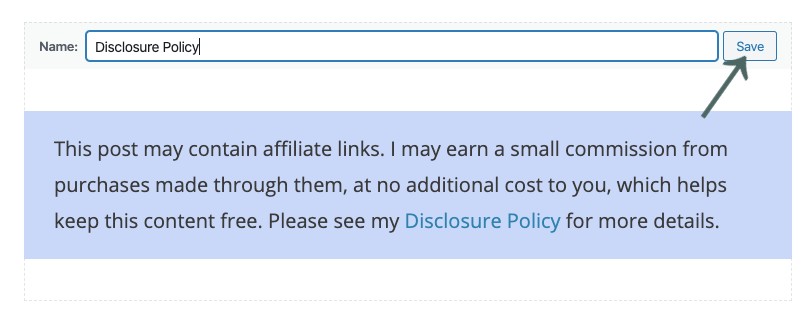
5. Next time you have a post with an affiliate link, insert this reusable block by adding a new block, search for the name of your reusable block, and select it.

Now you have a disclosure policy inserted into any post you wish at the click of the button.
That is great information! I never knew about the colour – so thank you for that tip. Do you know if the disclosure is needed for all countries? I disclose but just wondering. Thanks!
Different countries have different laws. I came across this blog post that has a rundown of other countries laws when it comes to affiliate disclosures: https://www.vamicreations.com/maker-life/how-to-start-a-blog-tips-with-affiliate-disclosure
This will be very helpful for when I need to do this on my own website. Your directions seem very straightforward.
Glad it was helpful!
Thank you Thank you! I have recently started using affiliate links from Amazon and I was not sure how to notify my readers. I will definitely be using your post as a guideline.
Happy to help! 😀
Thanks! This is great information, much appreciated.
You’re welcome!
This is so helpful. Thanks! didn’t know this needed to be visible in every post!
Yes, it’s good to have for any blog post that has an affiliate link in it.
Wow, you just made this so simple for me! I will bookmark it so that I can refer back to it when I get this point. Thank you so much!
Glad I could help!
Great idea. Thanks for sharing. I currently use a plug-in to disclose this information on my site however I just received an email explaining that plug-ins should only be used when highly required because threats to websites tend to come through the use of plug-ins. I will create my own re-usable affiliate disclosure block as this will allow me to reduce one of my plug-ins. Do you have any tips on how to ensure that I don’t overlook including this block? What strategy do you use that reminds you to include it into your posts?
I have a checklist that I have when making blog posts, so I don’t forget anything. One of the items on the checklist is, does this have an affiliate link? After doing it a certain amount of times, it becomes a habit. Additionally, it’s always easy to insert after the fact, if you forget to do it.
Thank you for this blog! I just started a blog and trying to learn all there is to know but I still have a lot to learn! This was great help and so informative for new bloggers like me that have no idea! I hope you will share other types of info such as this.
Happy to help!
Very helpful! Thanks!
😀