

Finding a theme that has all the features you need is sometimes hard until you are actually able to try the theme out. Here I will share how to download the free premium WordPress theme, Astra.
Astra is a free premium WordPress theme that has the capability to upgrade to its pro version if you want more features. This is great when you want to give a theme test run before you are ready to shell out your money for all the features. It also gives you the opportunity to get a theme for free if you are on a budget because the free version is still has a lot to offer.

This post may contain affiliate links. I may earn a small commission from purchases made through them, at no additional cost to you. Please see my Disclosure Policy for more details.
Free Premium WordPress Theme – Astra Features
The free version of Astra premium WordPress theme still comes loaded with plenty of features. Below is everything the free version is packed with.
Optimized Performance and Speed
Astra is optimized for performance and speed. This lightweight, yet premium theme loads in less than half a second. Not only does it use fewer resources than many other themes, but it also understands the best coding requirements for WordPress to ensure optimal code is in use.
Dynamic Design Options
- Layouts: Astra gives you the ability to control the layout of your website container, from headers and footers to posts and single pages.
- Transparent Headers: Create beautiful and inviting headers using a transparent header.
- Dedicated Sidebar: Astra allows you to customize your WordPress site using dedicated sidebars, which enables you to construct page-specific sidebars that override the default sidebar.
- WooCommerce Ready: This free premium WordPress theme is WooCommerce ready. Design your store with ease and be ready to sell your awesome product directly from your website.
Typography
Customize your WordPress sites typography using any one of Google Fonts web-ready fonts, or even use the free custom fonts plugin to use your own specific custom font. The font size is responsive depending on which device is used to view your website. Plus, Astra has enabled text transforms for heading tags, which allows you to display your text uniformly for an individual heading tag.
Colors & Background
Astra gives you the option to manage colors and backgrounds within the primary header, transparent header, blog/archive pages, single pages, sidebar, and footer.
Global Designs Options – Header and Footer
Astra has the capability to display your logo on your header in the left, right or center. Additionally, you can easily manage how to display and manage your content within the footer bar.
Integrations
Astra has basic schema markup implemented on your WordPress site in order for search engines to easily understand your website. Plus, Astra is an SEO friendly theme.
Additionally, Astra is made to work beautifully with page builders, such as Elementor, BeaverBuilder, or even WordPress’s Gutenberg.
Astra Widgets
Astra adds three new widgets. The address widget to frame and display your business address anywhere without code. The info list widget allows you to showcase an info list with icons wherever you need. The social icons widget offers the ability to add your social icons easily without the use of a third-party plugin.
How to Download the Astra WordPress Theme for Free
Find Astra here. Scroll down to the center of the page until you see Download Free Astra Theme, and click that link.

A popup will appear. You can now download the Astra Theme for free by either subscribing to their newsletter or clicking on the bottom link that says No thanks, I just want to download Astra.

Now Astra has downloaded to your computer in a zip file.
How to Install the Astra Theme on WordPress
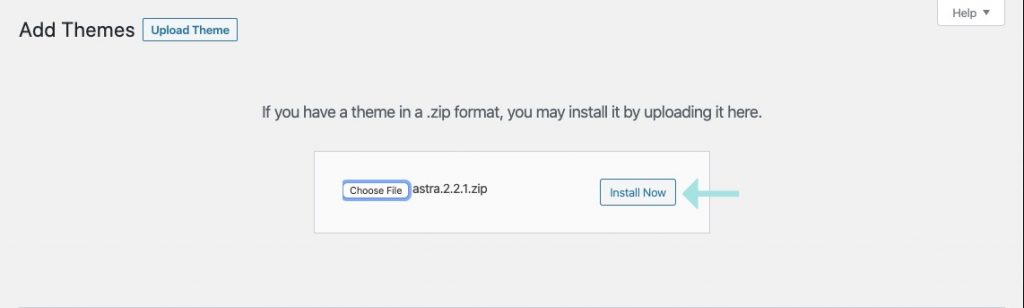
From your WordPress dashboard, go to Appearance > Themes. At the top of the page, click Add New > Upload Theme > Choose File. Now select the zip file you just downloaded from Astra, and hit Install Now.
Once the theme is installed successfully you can do Live Preview to preview the theme on your blog, Activate if you are ready to get started with the theme, or Return to Themes Page to return to the theme page if you’re not ready to active the theme just yet.

Looking for more help with Astra?
Astra provides in-depth articles here to help you through their awesome WordPress theme every step of the way.
Why do I recommend Astra?
The WordPress theme I use on my website is Astra Pro, the upgraded version. The moment I tried the free version, I instantly felt it was a step up from my previous premium theme. Additionally, it’s super customizable!
Pingback: How to Set Up Google Analytics for Your WordPress Site • Blog There